1
Learn to Drive
FAST
Train a policy from scratch, then with Stable-Baselines3, until the car laps without crashing.
- MDP formulation & reward basics
- PPO from scratch: actor-critic, GAE
- Practical training with SB3

Hands-on RL: From Sim to Real Autonomous Racing
From a car that can barely stay on track to one that beats the field, each module builds on the last.
Train a policy from scratch, then with Stable-Baselines3, until the car laps without crashing.
Shape the reward for speed, dodge static and dynamic obstacles, then deploy on the real car.

Optimize the raceline, learn residual policies on classical controllers, and see RL for everything.
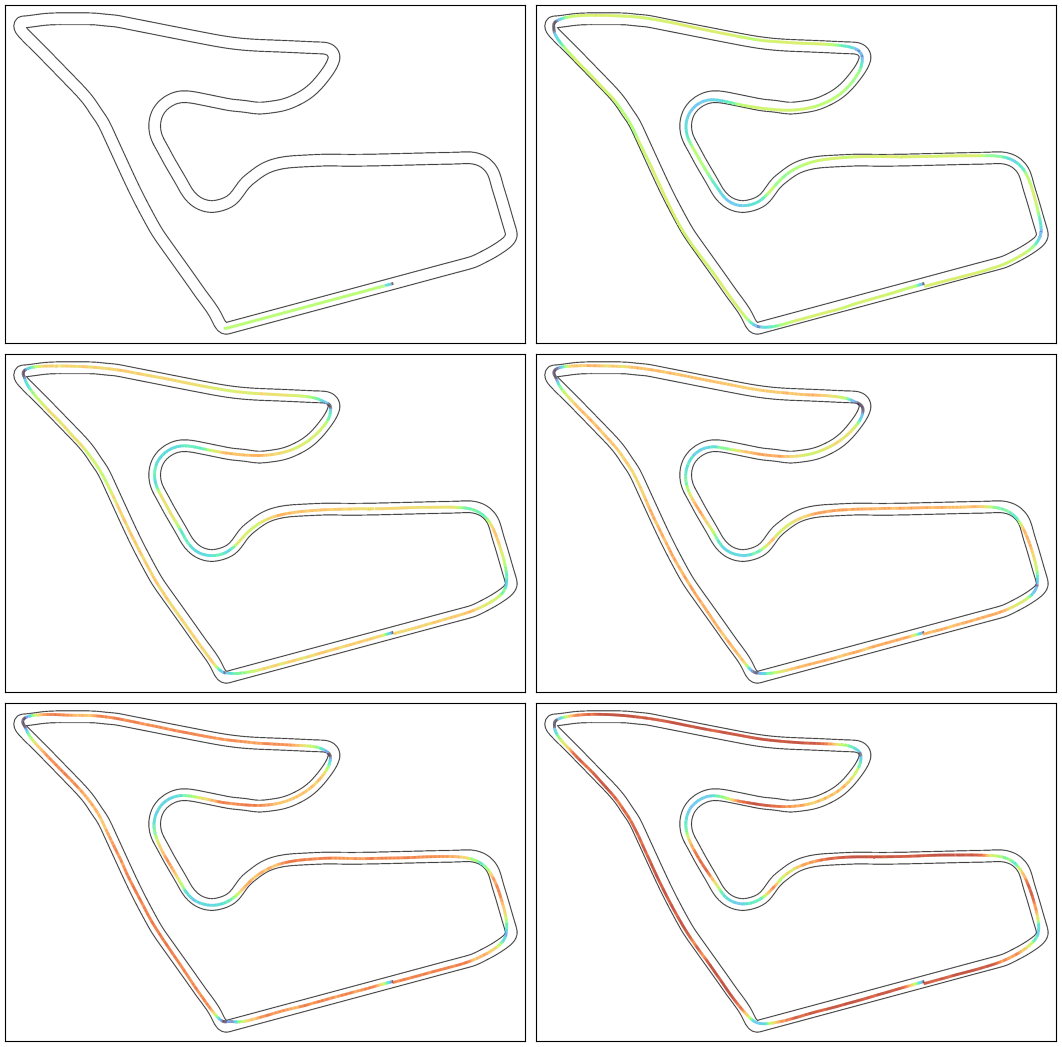
This course introduces reinforcement learning (RL) as a practical framework for autonomous racing on the Roboracer platform, treating learned policies as a principled extension of classical planning and control rather than a replacement for them. We frame perception, planning, and control as a single closed-loop decision problem in which a parametric policy maps raw LiDAR scans and odometry directly to steering and speed commands, while vehicle dynamics, actuator limits, and track geometry enter as explicit domain priors. The course content is organized into three progressive modules — Learn to Drive, Learn to Race, and Learn to Win — each shipped as a slide deck and one or more hands-on Colab notebooks, so you build a policy from scratch, shape it into a competitive racer, and deploy it on the physical Roboracer car. Emphasis throughout is on reward design, domain randomization, and safety filtering, so that learned policies stay data-efficient, robust, and deployable on real hardware — the same ideas that carry over to RL applications well beyond racing.
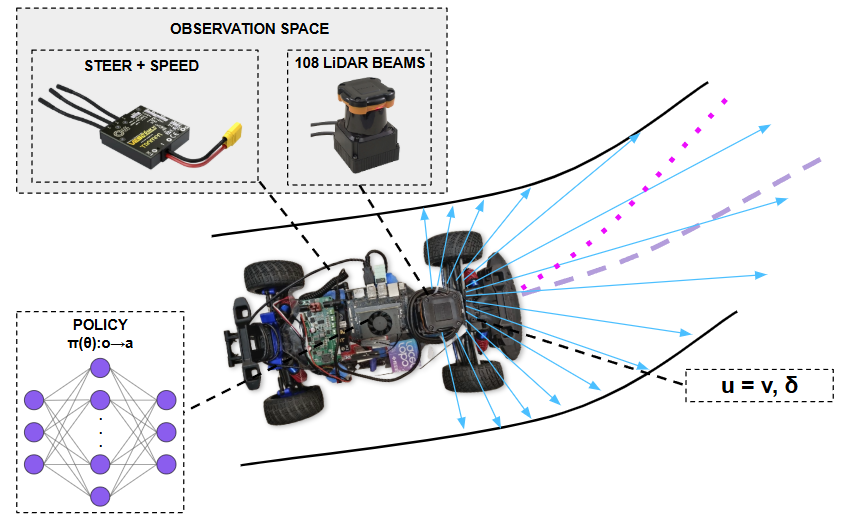
Here, \( {\color{#8BC34A}{\xi}} \) denotes the sampled track layout, vehicle parameters, and opponent scenarios, \( {\color{#E57373}{r}} \) defines a domain-aware reward combining lap time, track progress, and collision penalties, \( {\color{#64B5F6}{f}} \) and \( {\color{#64B5F6}{c}} \) encode the vehicle dynamics and the safety and actuation constraints, and \( {\color{#B39DDB}{\pi_\theta}} \) represents the learned policy mapping observations to steering angle and speed commands.
Every module ships as a slide deck and one or more Colab notebooks you run end to end in the browser, no local install or GPU required. Here is what to expect from each module.
Start with the slide deck for the formal treatment: the MDP formulation, the network architecture, and the exact PPO update rule used in the notebook. The deck also gives a simple, section-by-section walkthrough of the notebook, so you know what each part does before you run it.
Open the module's Colab notebook and run every cell top to bottom. No ROS installation and no prior RL experience required — each notebook explains every concept as it introduces it, and trains a policy in well under an hour on a free Colab GPU.
From Module 2 onward, take the policy you trained in simulation and run it for real, as a ROS 2 node on the physical Roboracer car.
Each module's slide deck opens in the browser with its own page-by-page viewer.
Run every module's code end to end in Google Colab — no local install or GPU required.

Instructor
Professor, Electrical and Systems Engineering
University of Pennsylvania

Teaching Assistant
Electrical and Systems Engineering
University of Pennsylvania
Teaching Assistant
Mechanical Engineering and Applied Mechanics
University of Pennsylvania

Teaching Assistant
Robotics
University of Pennsylvania

Teaching Assistant
Robotics
University of Pennsylvania
Teaching Assistant
Robotics
University of Pennsylvania
Everything runs directly in Google Colab — no local install, no GPU, and no setup required. Each module's notebook link above opens ready to run, top to bottom.
Module 1 also includes export_ppo_onnx.py and ppo_deploy_node.py, the scripts
for exporting a trained policy and running it on the car, and every module has a matching in-browser
slide deck above.
Deploying a trained policy on the physical car additionally requires ROS 2 and the Roboracer system
stack on the onboard computer — see ppo_deploy_node.py for the deployment node.